
What is Web Analytics?

Web analytics is the process of measuring, collecting, analyzing, and reporting data from websites. It helps businesses understand user behavior, improve user experience, optimize content, and make data-driven decisions.Web analytics is the practice of collecting, measuring, analyzing, and interpreting data from websites to understand how users interact with online content. It helps businesses track key metrics such as pageviews, user behavior, traffic sources, bounce rates, and conversions. By analyzing this data, organizations can identify what is working well on their website and what needs improvement. Web analytics supports data-driven decision-making, helps optimize user experience, enhances marketing performance, and ultimately contributes to higher engagement and business growth

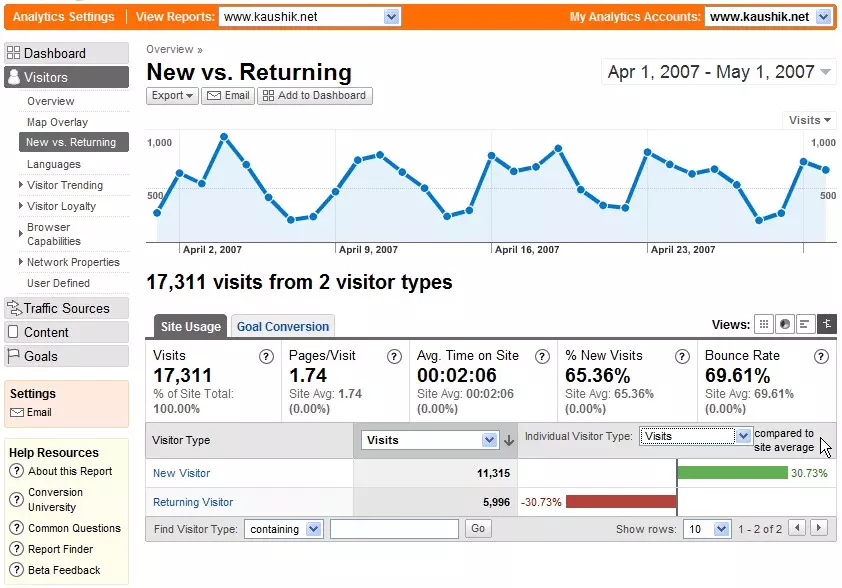
Web Analytics Image

Web Analytics Involves:

1.Data Collection

Web analytics tools collect information such as:

  • Pages visited
  • Time spent on each page
  • User location and device
  • Clicks, scrolls, and interactions
  • How users arrived at the site (search, social, ads, direct)

2.Data Analysis

The collected data is analyzed to answer questions like:

  • Which pages attract the most attention?
  • Why do visitors leave the site quickly?
  • What content converts visitors into customers?
  • Which marketing channels perform best?

3.Reporting & Visualization

  • Dashboards
  • Charts
  • Funnels
  • Traffic flows

Key Metrics

Pageviews, Sessions, Users, Bounce Rate, Session Duration, Conversion Rate

Common Web Analytics Metrics

  • Pageviews – number of pages viewed
  • Sessions – individual visits
  • Bounce Rate – % leaving quickly
  • Traffic Sources – where users come from
  • Conversions – desired actions

Add Web Analytics

    1. Choose a Web Analytics Tool

  • most popular option is Google Analytics (GA4).
  • Other options: Adobe Analytics, Matomo, Mixpanel, Hotjar.
  • 2. Sign Up / Create an Account

  • For Google Analytics:
  • Go to Google Analytics
  • Sign in with your Google account.
  • Click “Start measuring” and create a property for your website.
  • Set up data streams (e.g., Web, iOS, Android).

What is Google Analytics?

google analytics visual representation

Google Analytics is Google’s free web analytics service that provides powerful insights into website performance.Google Analytics is a powerful and widely used web analytics platform developed by Google that helps website owners understand how visitors interact with their site. It collects data on user behavior, including pageviews, session duration, traffic sources, devices used, geographic locations, and actions taken on the website. The platform provides detailed reports, dashboards, real-time insights, and conversion tracking tools that allow businesses to evaluate performance, measure marketing effectiveness, and identify opportunities for improvement. Google Analytics is essential for optimizing website content, improving user experience, and making informed, data-driven decisions.

Key Features

  • Real-time visitor tracking
  • User demographics and interests
  • Conversion and goal tracking
  • Traffic acquisition reports
  • Google Ads & Search Console integration

Google Analytics Notes:

  • Analytics is a free, widely used web analytics service by Google.
  • Tracks user interactions, demographics, traffic sources, and conversions.
  • Offers real-time reporting and detailed dashboards.
  • Integrates with Google Ads and Search Console for marketing insights.
  • Supports tracking goals such as purchases, signups, and downloads.
  • Uses tracking code (GA4 recommended) embedded in websites for data collection.
  • Helps businesses optimize websites, improve marketing ROI, and make data-driven decisions.

How to Add Google Analytics to a Website

<script async src="https://www.googletagmanager.com/gtag/js?id=G-XXXXXXXXXX"></script>
<script>
  window.dataLayer = window.dataLayer || [];
  function gtag(){dataLayer.push(arguments);}
  gtag('js', new Date());
  gtag('config', 'G-XXXXXXXXXX');
</script>